Start with the job, not with “full control”
“Let the AI use my computer” is too broad to be a useful permission.
A better starting point is a real job:
- inspect a project folder,
- organise approved downloads,
- run a test suite,
- compare browser-visible information,
- collect hardware status,
- prepare a migration,
- operate a dedicated test device.
Once the job is concrete, you can decide which capabilities it actually needs.
1. Separate read from write
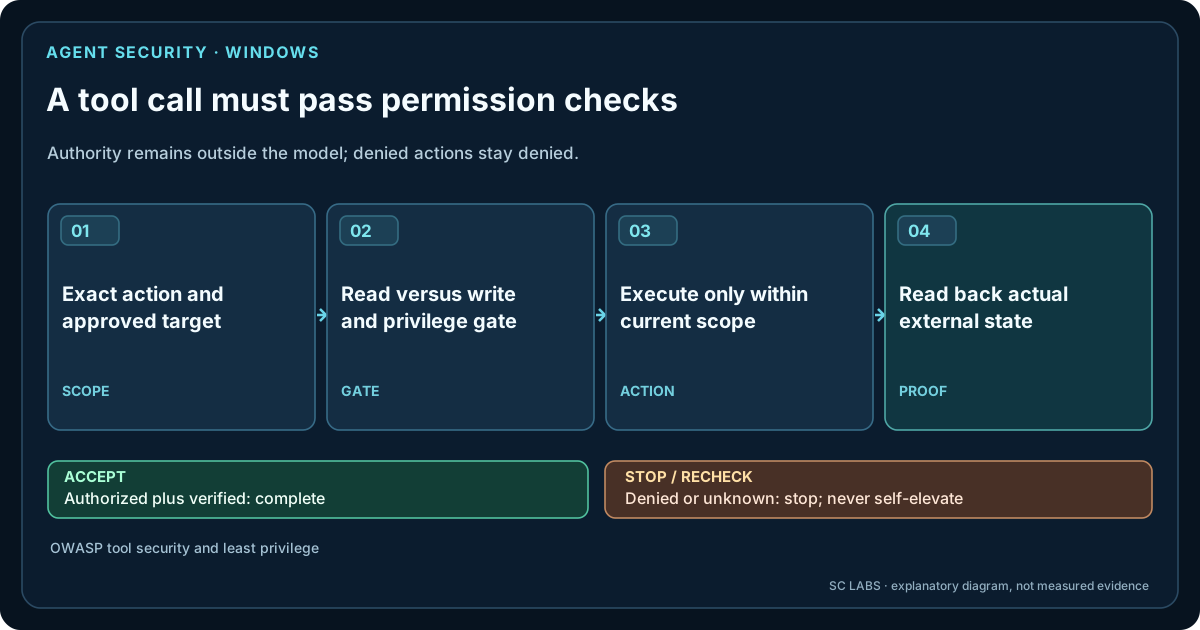
Reading a file and changing a file are different risks. Listing processes and stopping a process are different risks. Inspecting a browser page and submitting a form are different risks.
Model those permissions separately.
| Capability | Lower-risk example | Higher-risk example |
|---|---|---|
| Files | List/read within an approved root | Move, overwrite or delete |
| Processes | List running processes | Stop or start programs |
| Browser | Read a page | Submit, purchase, publish or change account state |
| UI | Inspect visible state | Click buttons that change system/account state |
| Network/API | GET/read-only request | POST/DELETE or privileged mutation |
2. Scope filesystem access
Do not make the entire disk the default workspace.
Prefer explicit roots, such as one project directory or one user-selected folder. Reject traversal outside the approved path. If the task needs another location, expand the scope deliberately rather than silently.
This is especially important for systems that can combine model reasoning with shell or filesystem tools.
3. Use allowlists for executable actions where practical
If the job only needs a small set of commands or programs, register those tools rather than exposing an unrestricted shell as the only interface.
A dedicated “run tests” capability is easier to reason about than “execute any command”. A dedicated file mover with path guards is easier to audit than general scripting with unrestricted paths.
General terminal access can still be useful in controlled engineering environments, but its permission should reflect the broader authority it grants.
4. Put approval gates around consequential actions
Approval should be tied to consequence, not to every single operation.
Useful approval points can include:
- destructive file operations,
- software installation or uninstall,
- reboot/shutdown,
- credential or account changes,
- external publication or submission,
- purchases or payments,
- security-sensitive exceptions,
- actions outside the originally agreed workspace.
The concept is explored in more depth in Approval-Gated AI Agents, while Human-Controlled AI Permissions turns the same principle into a capability/target/duration model.
5. Keep credentials separate from model-visible context
A tool may need authenticated access without placing the raw secret into the model prompt, logs or UI transcript.
Prefer token brokers, OS credential stores, scoped environment injection or tool-side authentication where the model requests an operation but does not need the secret itself.
Also keep logs from becoming accidental secret stores.
6. Verify external state after every meaningful change
Execution is not verification.
Examples:
- after moving a file, list/read the destination;
- after editing configuration, parse or validate it;
- after running a build, inspect the exit code and expected artifact;
- after an API mutation, read the resulting server state;
- after a UI click, inspect the visible state rather than assuming success.
This is one of the core ideas in How to Test an AI Agent Properly.
7. Distinguish success, failure and unknown
An interrupted action is not automatically a failure, and it is not automatically a success.
If a timeout happens after a request was sent, the system may not know whether the external change occurred. Mark that state as unknown and verify before retrying. Otherwise an “automatic retry” can duplicate an action that already succeeded.
8. Make retries bounded and state-aware
Unlimited retries turn transient errors into uncontrolled loops.
Use a small retry budget, backoff where appropriate, circuit breakers for unhealthy providers and idempotency or verification before repeating state-changing actions. Our guide on building agents that survive failure covers this layer.
9. Keep the model replaceable from the permission system
The model should not be the security boundary.
A stronger model may make better decisions, but the runtime or tool layer should still enforce path rules, grants, timeouts and protected operations. If changing providers also changes what the AI is allowed to do, the architecture is mixing intelligence with authority.
The same separation lets an operational system choose between local and frontier AI without changing the permission model.
10. Test the denial path
A permission system is not proven by requests that should succeed.
Try to:
- read outside the approved directory,
- run a non-allowed program,
- invoke a write action with read-only permission,
- use a capability after its grant is removed,
- continue after approval is denied.
The system should fail explicitly and predictably.
11. Preserve an audit trail without turning it into surveillance
For a controlled AI workflow, useful audit evidence may include task ID, requested capability, permission decision, tool result, verifier result and timestamps.
That does not require collecting unrelated user activity or sending telemetry to an external analytics service.
Keep the audit proportional to the operation and privacy model.
12. Keep consequential decisions human
The exact line depends on the use case, but some actions should remain explicitly owned by a person.
Examples include responsible disclosure, financial commitments, employment decisions, legal acceptance, irreversible destructive actions and exceptions to the agreed security boundary.
Operational AI can perform substantial work before and after those decisions without pretending that accountability has disappeared.
A practical permission ladder
| Level | Typical authority | Use |
|---|---|---|
| 0 | Reason only | Advice and planning |
| 1 | Read approved evidence | Inspection and analysis |
| 2 | Use bounded non-destructive tools | Tests, queries, selected browser/API operations |
| 3 | Write within scoped workspace | Edits, organisation, generated artifacts |
| 4 | Sensitive changes with approval | Install, restart, account/system mutations |
| 5 | Consequential human decision | Submit, purchase, publish, disclose, irreversible exceptions |
The point is not the exact numbering. The point is to avoid one undifferentiated “agent has access” state.
How ARKTOR approaches the problem
ARKTOR is built around the same principle: useful machine capability should grow without turning every optional feature into one permanently privileged runtime.
Its public architecture separates execution, agent runtime, connectivity, memory and capability layers. Product paths such as ARKTOR Go and the physical Android pilot use different platform surfaces while keeping explicit permission and evidence boundaries.
Detailed test evidence is kept in SC Agent Lab, and the Engineering Journal security-research story shows why human scope and final decisions matter even when the system can perform complex operational work.
Independent security guidance
The OWASP AI Agent and MCP security guidance recommends distinct agent identities, narrowly scoped permissions and deliberate control of high-impact tool use. Those checks belong in the execution and authorization layer, not merely in the language-model prompt. They complement — but do not replace — independent checking of the result.
The simplest rule
Give AI the smallest useful capability for the current job, verify the external result, and make every expansion of authority explicit.
Applying this to a real Windows environment?
Discuss one permission-scoped workflow and the systems the agent must not touch. A pilot starts with a scoped conversation, not a promise of public product availability.
Discuss a scoped ARKTOR pilot