
It sounds efficient to give an image model a story and ask it to create twenty pictures immediately. In practice, a bad second frame can poison everything that follows. The model spends time rendering scenes based on decisions nobody has reviewed.
We changed our local Story Mode workflow to separate planning from rendering.
The separation between model output and verified workflow is a recurring theme in SC Agent Lab, where individual capabilities are recorded with their limits.
For a broader view of the controlled AI work behind these experiments, see the ARKTOR platform overview. The storyboard tool remains a separate development workflow.
Make the storyboard inspectable
The planning stage creates a short record for the story: title, style, characters, identity details and each scene's intended action. The person can inspect these before the image backend starts its expensive work.
If the mage is supposed to carry a spellbook throughout the story, put that in the character record. If the crown must appear in the final scene, make it a checkable scene requirement.
Correcting the scene description takes seconds. Regenerating ten images costs considerably more.
Use three reference modes
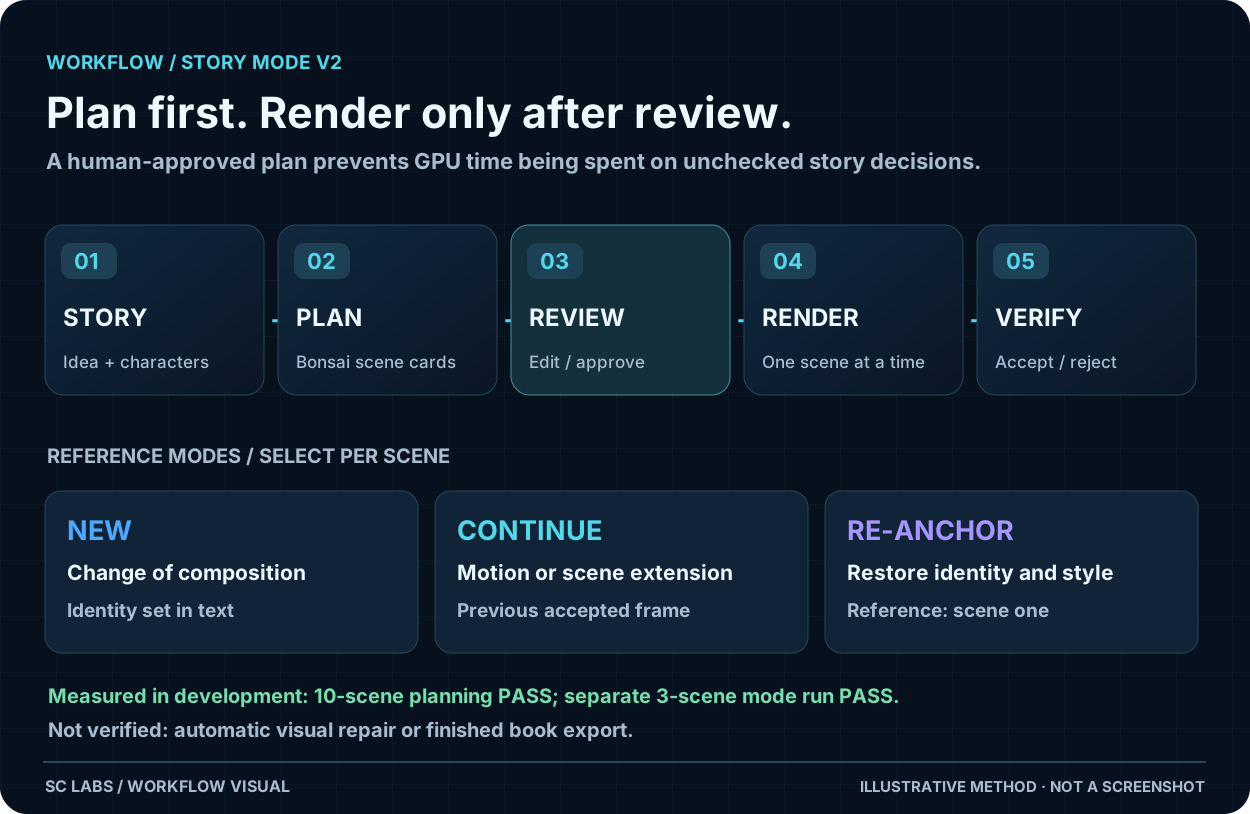
A continuous image sequence needs different kinds of changes.
NEW starts a scene with a markedly different composition or location, relying on written character constraints.
CONTINUE uses the last accepted frame where movement and continuity matter.
RE-ANCHOR returns to the first scene as a visual anchor when identity or style has drifted.
Using CONTINUE for every scene once looked like the simplest rule. A later long-sequence test showed it could preserve unwanted composition and duplicate characters. The right choice depends on what the next scene is supposed to do.
The ten-frame continuity lesson explains why a previous-frame reference can carry errors forward.
An additional image-validation pass can reject a failed frame before it becomes the next reference.
Let the editor change the plan
When a person edits a character's identity record, automatically rebuild prompts that have not been manually customised. But preserve explicit manual edits. Otherwise the interface may display one instruction while the renderer uses another.
Save the plan and prompts before generating. Render scene one, inspect it, and then continue one scene at a time. Keep rejected candidates without allowing them to replace the accepted reference.
What our local checks proved
On 6 October 2026, internal Story Mode V2 evidence recorded a successful ten-scene planning test, with planning taking 77.1 seconds on an RTX 2080 Ti. A separate three-scene run successfully exercised NEW, CONTINUE and RE-ANCHOR rendering. Character-lock changes also regenerated non-manual prompts correctly.
These are bounded engineering results. They do not yet verify automatic drift scoring, a complete repair loop, child-friendly speech interaction or print-ready book export.
A useful acceptance test
A person should be able to create and edit the storyboard, render the first scene, choose a different reference mode for the next, reject a bad frame and reopen the saved project. Only after those steps work reliably should bulk generation be treated as a convenience feature.
For related methods, see How to Test an AI Agent Properly and the published character-consistency guide.
The aim is simple: spend the planning effort where corrections are cheap, and GPU time where the plan has earned it.