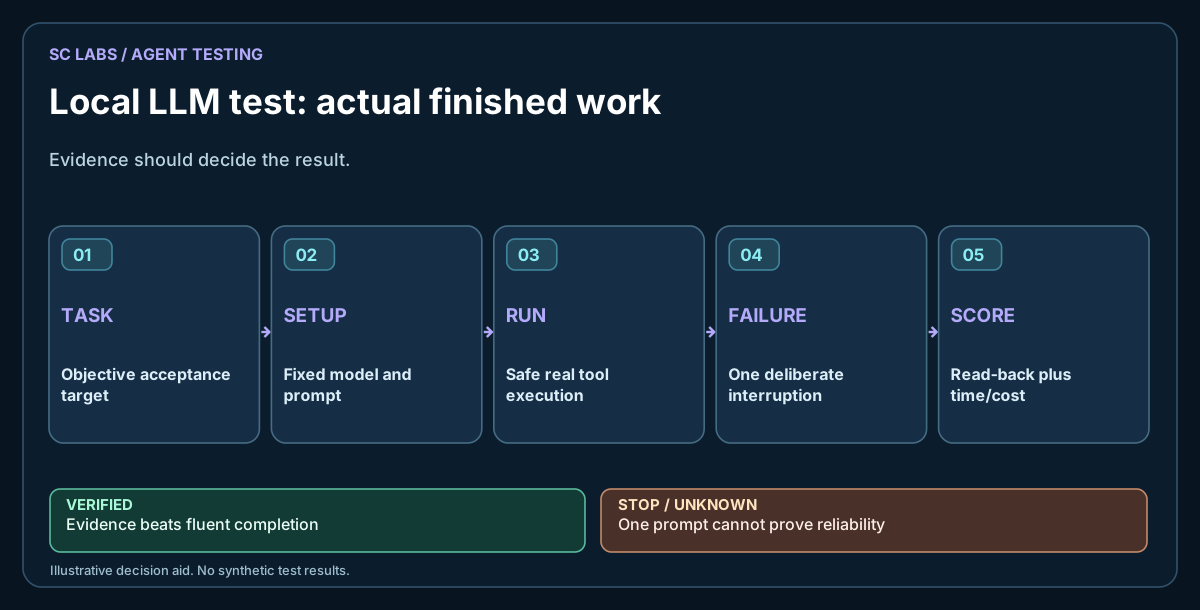
A model can answer twenty questions convincingly and still fall apart when asked to edit a file, follow a layout brief and prove that the result works. That gap is the reason we stopped treating chat quality as the only measure of a useful local AI model.
One of the more revealing tests is surprisingly ordinary: ask several models to build the same landing page in isolated workspaces. Keep the brief fixed, let each model use the same permitted tools and inspect what it actually delivers.
This is also why SC Agent Lab focuses on retained evidence and known limitations, rather than treating a model-generated demonstration as a completed workflow.
The ARKTOR product direction provides the wider context for separating model decisions, execution permissions and independent checks.
Start with a job you can judge
A landing page is useful because it puts several skills under pressure at once. The model has to read instructions, organise content, work with files, respect constraints, produce usable markup and avoid inventing product claims. It also has to stop at the right boundary.
Our suggested brief asks for a responsive page for a fictional, privacy-focused desktop utility. The page needs a clear heading, three product benefits, a simple comparison section, an FAQ and one call to action. It must work without external libraries, remote fonts, trackers or unnecessary JavaScript. The page belongs in a sandbox, not on the production website.
This isn't a test of who writes the longest HTML. We want to know whether a reader could use the page, whether it behaves on a phone and whether the model followed the instructions without being babysat.
Give every model the same conditions
Create a fresh directory per contender and freeze the brief. Use the same input documents, tool permissions, time budget and evaluation checklist. Record the actual model file, quantisation, runtime, context allocation, GPU, RAM and whether anything was offloaded to the CPU.
If one model gets three extra retries and another gets none, the scores do not describe model capability alone. Record rescue attempts separately rather than hiding them in the final result.
Keep the evaluator independent of the agent that wrote the page.
Independent read-back verification tells you whether the files and runtime state match the claim; a model choosing a correct command is only the first half.
For another real build failure, read the output-length survival test, where a model generated code but did not finish the page.
What to score
| Dimension | What to check |
|---|---|
| Brief compliance | Every requested section exists; no unasked-for product promises |
| Technical correctness | Files load locally, links work, HTML is well formed |
| Responsive usability | No horizontal scrolling or unreadable blocks on narrow screens |
| Editorial quality | Specific, readable copy without generic AI marketing language |
| Tool discipline | No access outside the sandbox, no unnecessary installs |
| Recovery | The model can diagnose a failed check and make a bounded repair |
| Verifiable finish | An independent test confirms the delivered page, not just a success message |
Use pass, partial, fail and unverified. A pretty screenshot cannot compensate for missing text or broken navigation.
Add a failure that should not become a crisis
Halfway through the build, return a normal tool error. Remove a non-essential asset, or deny an attempt to read outside the workspace. A competent agent should report the restriction, preserve what it has already built and use a permitted alternative. It should not claim it bypassed the restriction or quietly change the task.
Repeat each run enough times to spot inconsistency. A single success is a demonstration; several runs give you a more useful picture of reliability.
Separate the model from the system around it
The model may produce the right tool instruction while the runtime fails to execute it. A browser may fail to load while the HTML is sound. A page may render well while its content makes unsupported claims.
Those are different failure classes. Record them separately. Otherwise the test tells you little about what to improve.
The SC LABS agent-testing guide describes the full chain: model, route, permission, tool, state, verification and recovery. Our local-versus-frontier guide covers when the comparison itself is fair.
The useful result is a decision
At the end, save the delivered page, a screenshot at desktop and mobile widths, tool logs, test findings and a short reviewer verdict. If a model requires constant rescues for a task you need every day, a good chat score will not change that.
For operational use, pick the smallest model that completes the real workload reliably enough under your own hardware, latency and privacy constraints. A bigger number in a leaderboard isn't a substitute for a working result.
Evidence note: this is a reproducible test method, not a claim that the proposed SC LABS landing-page benchmark has already passed.