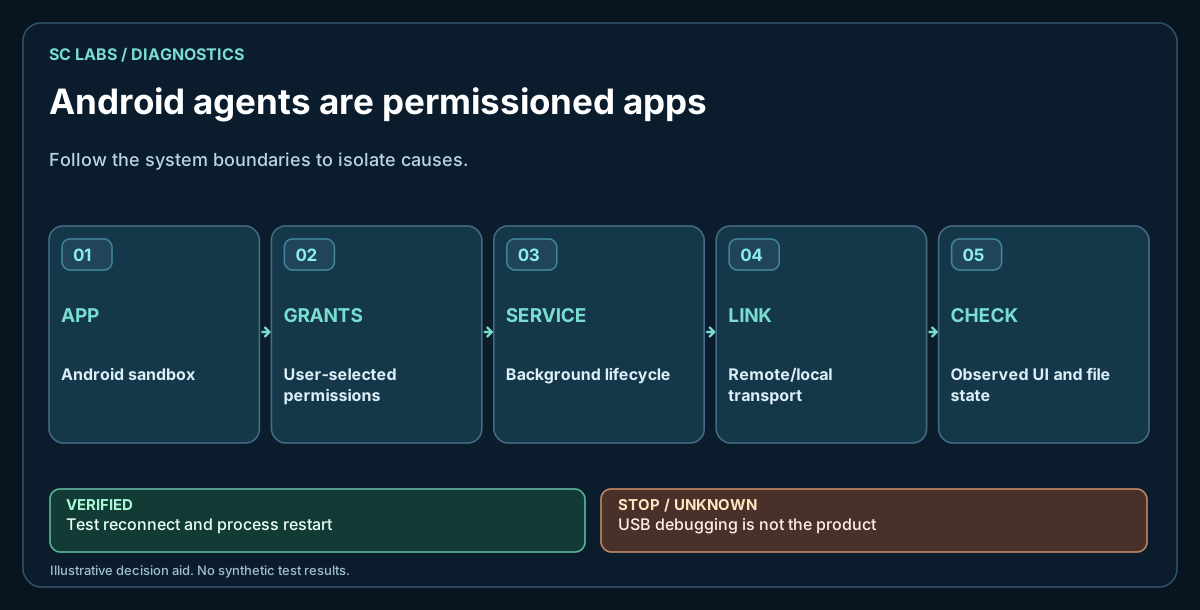
Start by deciding what the phone is
An Android device can be a chat client, a local inference host, a remote endpoint, a sensor/tool gateway or a hybrid. These roles have different hardware and permission requirements. Do not require the phone to run the largest model locally if the product only needs it to be a secure endpoint.
For the model-routing decision, see Local AI vs Frontier AI for Real Agent Work.
Use native Android permission boundaries
Files, notifications, screen capture and UI control are not one permission. Treat them separately.
- Storage: prefer user-selected Storage Access Framework grants where practical.
- Screen: use consent-gated MediaProjection rather than assuming silent capture.
- UI control: use Accessibility deliberately and expose its state clearly.
- Notifications: detect access state and guide onboarding instead of silently failing.
The same capability/target/duration principle is explained in Human-Controlled AI Permissions.
Background execution is a product requirement
Android and manufacturer power-management layers can stop or restrict background work. Test the actual target device, not only an emulator. Document any manual background/start-management requirement used in the lab.
Do not make USB the product architecture
ADB is valuable for development and diagnostics. A mobile agent that only works while tethered to a developer machine has not yet proven its normal runtime path. Test the intended LAN, direct or remote transport separately.
Keep transport identity explicit
Persist a device identity. Authenticate peers. Pin or otherwise verify the expected endpoint where the design requires it. Avoid quietly falling back from a protected path to plaintext because a connection failed.
Termux is useful, but it is not Android system authority
Termux is excellent for local utilities, scripts and portable tooling. Its app UID does not automatically gain Android shell/system permissions. If your agent needs permission-scoped Android capabilities, implement them through the appropriate native app APIs rather than pretending Termux can see everything.
Test storage with real user grants
List, read and write a dedicated test file through the exact URI/root the product will use. Verify persistence of the grant after app lifecycle events. Keep app-private storage and user-selected external roots conceptually separate.
Test UI automation as state, not coordinates
Prefer find/wait/state-tree approaches over fixed delays and blind coordinate taps. Android layouts move. A dependable path checks that the intended UI element exists and verifies the resulting state.
Make screen capture bounded
Set image-size and frequency limits. Screen capture can become an accidental bandwidth, memory and privacy problem if the agent treats it as an unlimited video stream.
Measure the provider from the phone's real network path
Provider reliability can look different from the device network than from a workstation. Record timeouts, status codes, latency and usable-response validation from the endpoint where the agent runs.
Separate phone capability from model capability
If a frontier model runs in the cloud, say so. If a local model runs on a workstation and the phone calls it, say so. If inference is on-device, publish the exact model/quant and hardware context. “AI runs on Android” is otherwise too ambiguous to be useful.
Test recovery without damaging the device
Exercise network loss, app process restart and denied permissions before destructive tests. Cold-start/reboot testing can be valuable, but on a shared or important device it should be an explicit test gate rather than an automatic debugging step.
A practical Android agent checklist
| Area | Verify |
|---|---|
| Identity | Persistent device identity and trusted peer |
| Transport | Normal path works without USB |
| Storage | Real SAF/app-private read-write proof |
| UI | State-aware find/wait/action |
| Screen | User consent + bounded capture |
| Notifications | Permission state + list/action behaviour |
| Local tooling | Controlled stdout/stderr/exit/timeout |
| Provider | Route health from the device network |
| Recovery | Reconnect/lifecycle behaviour |
| Evidence | Retained versioned real-device result |
What our Huawei proof taught us
On a physical Huawei P30 Pro, the current physically verified baseline is ARKTOR Android 0.8.7 / versionCode 22, an advanced Product Workbench prototype. The immediately preceding 0.8.6 build passed the full 15-point physical regression; 0.8.7 added only two UI hotfixes, both physically re-verified.
The current Product Workbench proof includes chat create/open/switch/rename, persistent history, model switching with retained context, OBI/Gemma/Qwen routes, real Vision E2E, image thumbnail/tap preview/persistence, verified Android actions, reconnect/lifecycle behavior and DE/EN/System language. The earlier 0.7.1 endpoint checkpoint with 18/18 tests and 12/12 capabilities READY, and the still earlier 0.4.0 checkpoint, remain historical evidence. No general public Android release is claimed.
The same Android foundation was later exercised through a physical automotive/AI-TBox endpoint and in-vehicle display. Retained evidence now also covers independent 4G/LTE remote operation and reconnect after restart. The exact private routing/overlay technology behind a displayed private peer address remains unspecified; no VPN, WireGuard, Cloudflare or equivalent layer is inferred. App/UI operation is still not CAN, ECU or safety-critical vehicle-control authority.