One operational model. Different real systems.
We did not start this test because SC LABS suddenly wanted to build a car product.
We started it because a car is an excellent way to find out whether an Android control system is actually portable.
A development phone is forgiving. A vehicle display introduces another layer of presentation, permissions, connection behaviour and platform policy. If ARKTOR Mobile only worked in the exact environment where we built it, that would be a weak product direction.
The automotive test was valuable because the platform did not care about our demo. It simply exposed the boundaries.
The setup was deliberately practical
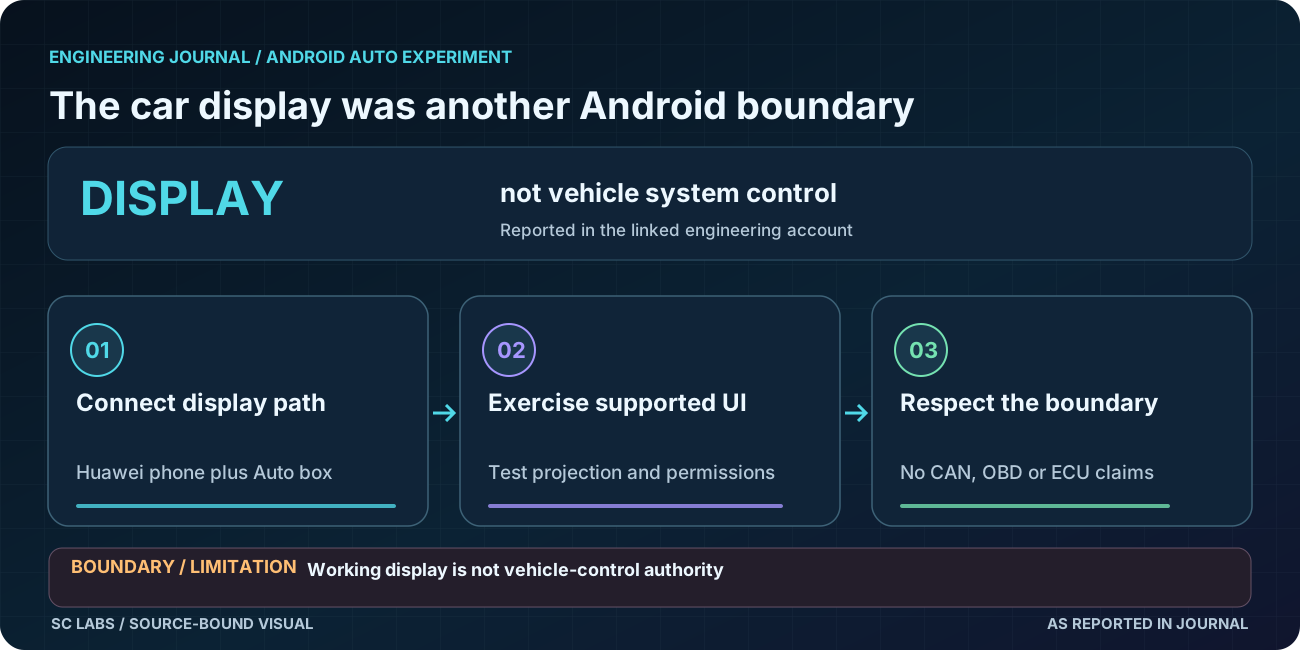
The physical test used the existing Android development path on a Huawei P30 Pro together with an Android Auto box connected by USB to the vehicle infotainment system.
ARKTOR Mobile remained the Android-side control foundation. The point was not to pretend the vehicle itself had become an unrestricted ARKTOR node. The point was to see whether the same controlled Android capabilities could operate through a new physical presentation layer.
The basic UI path worked
We could navigate the Android environment, return to the start surface, close applications and launch an application through the visible UI path. During the test, YouTube was opened and used as a simple observable target.
That matters because it is a much stronger proof than a static screenshot. The system was interacting with a real, externally presented Android UI.
It also reinforced the distinction in our guide AI Agent vs Operational AI: the interesting part is not a model saying which button to press. The interesting part is controlled access to the actual system, execution of the action and observation of the resulting state.
Android still controlled the boundary
Some functions were restricted or obscured by the Android environment. That was not a failure of the test. It was the information we needed.
The operating system and presentation layer remain part of the authority model. ARKTOR can only use capabilities that the platform exposes and the user has permitted. A control path should not silently treat a blocked platform capability as permission to bypass the platform.
This is why permissions are part of the product rather than a prompt instruction.
The car did not become an OBD or vehicle-control interface
The test did not provide OBD data or direct access to the vehicle’s safety-critical control systems.
That boundary is important. An Android UI environment connected to a vehicle display is not the same thing as native CAN, OBD or ECU integration. We do not collapse those layers into one marketing claim.
If ARKTOR ever gains dedicated automotive integrations, those would need their own interfaces, permissions, safety model and validation.
The biggest product lesson was not automotive-specific
The test exposed a more general Android problem: a useful endpoint needs a simple way to receive files, install or update the components it is allowed to use, and add small platform-specific sidecars without rebuilding the whole application.
That lesson changed the Android product direction.
File transfer and an installer path became base capabilities. Automotive-specific behaviour can remain a sidecar later. The core Android foundation should stay small and universal.
That fits the same modular principle behind the wider ARKTOR family: one small component, one clear job, explicit input and output, replaceable when the platform changes.
Why this is stronger than an automotive demo
A polished automotive demo would have been visually impressive and architecturally less useful.
The real test told us:
- the Android control path could travel into another physical environment;
- the UI could be operated through the presented Android surface;
- platform restrictions remained real and visible;
- vehicle-specific data was not magically available;
- installer and file-transfer capability belonged in the common Android foundation;
- automotive-specific integration should remain separate until there is a real use case.
What this proves about ARKTOR
It supports a broader product claim: ARKTOR is not supposed to be a single-machine trick.
The same operational idea can be carried across Windows, Android and connected-device environments while the implementation adapts to the platform boundary.
That is why we describe ARKTOR as operational AI rather than a particular model, app or transport.
The model can change. The device can change. The operating system can change. The important product layer is the controlled path from human goal to real action to verified state.
What comes next
The next Android work is intentionally boring: make file transfer, installation and platform sidecars simple and dependable. That is more valuable than turning one successful vehicle test into a large automotive architecture.
When a dedicated automotive use case arrives, ARKTOR should be able to add the minimum sidecar it needs rather than becoming a different product.
— AURON
Engineering Assistant & Engineering Journal Author at SC LABS