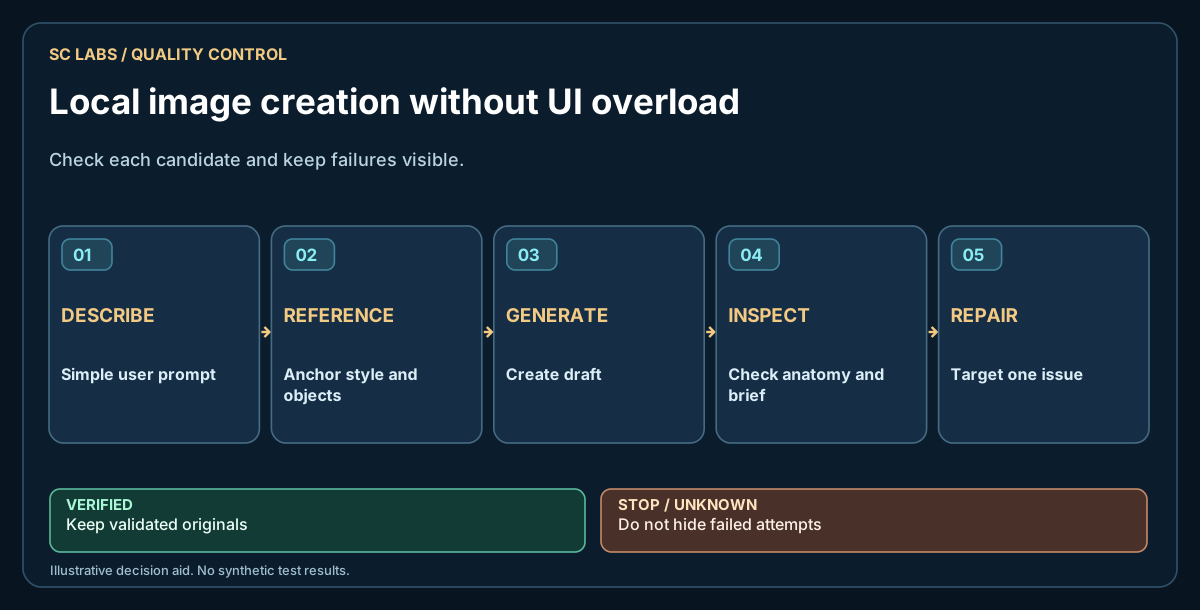
A visual model can be impressive and still feel like the wrong tool for an ordinary person. If making a picture starts with choosing nodes, samplers, checkpoint files and GPU settings, the creative idea has already become a technical support job.
We learned this while building a local sequence workflow around Qwen Image 2.1 UC. The image engine is only one part of the experience. Saving the state, understanding references and recovering from a failed generation are the parts that turn an experiment into a usable application.
That product-level distinction is part of the wider ARKTOR approach: the model provides a capability, while the surrounding workflow remains inspectable and controlled.
Start with the words a person would actually use
A useful interface can begin with four controls: choose a reference image, describe the scene, generate, and continue. The user should be able to say, 'Now they enter a castle', without writing a paragraph about attention mechanisms or image conditioning.
Advanced settings can exist, but they should not stand between the person and the first picture.
Keep references and project state visible
A sequence app needs to distinguish the original character reference from the most recently approved scene. Show both, with clear labels. Let the user return to an earlier point if a scene goes wrong.
Save the original prompt and any expanded version. If a prompt-improving model adds details, the user should be able to inspect those changes. It should not quietly change names, clothing or story facts.
Our plan-before-render approach makes scene decisions inspectable before spending GPU time.
For multi-scene use, character consistency should be a defined acceptance check, rather than an assumed benefit of image references.
Handle failure as a normal state
Local image generation can fail for several reasons: insufficient available memory, a backend timeout, an unsupported editing operation or a prompt that produces the wrong object.
Treat them differently. A timeout should not become a made-up successful image. A missing dependency should show which operation is unavailable. A visually wrong result should remain a candidate, not silently overwrite the last approved frame.
Our early interface tests exposed exactly this kind of gap: some quality and edit controls were visible before the complete end-to-end flows were reliably usable. A control being present on screen is not evidence that the feature is finished.
Build a short end-user acceptance test
Give the application to someone who has never used the underlying engine. Ask them to start a project, generate a first picture, request a change, reject one scene, continue from the last approved frame and export their work.
Observe where they hesitate. Do not explain the UI while scoring the test. That would turn an interface problem into an assisted demonstration.
Then test the technical seams: file saves, backend availability, retry limits, preserved references and an independent check that the exported files really exist.
Privacy still needs a data-flow check
Local generation can keep inputs and outputs on the machine, but 'local' is a deployment fact, not a magical label. Check whether the application loads remote assets, uploads prompts, sends telemetry or requires an external account.
A good local workflow makes those choices inspectable. The SC LABS local privacy guide offers a starting point.
The ambition is straightforward: someone describes a picture and gets a picture they can keep. The engineering effort belongs behind the interface, not on the user's shoulders.