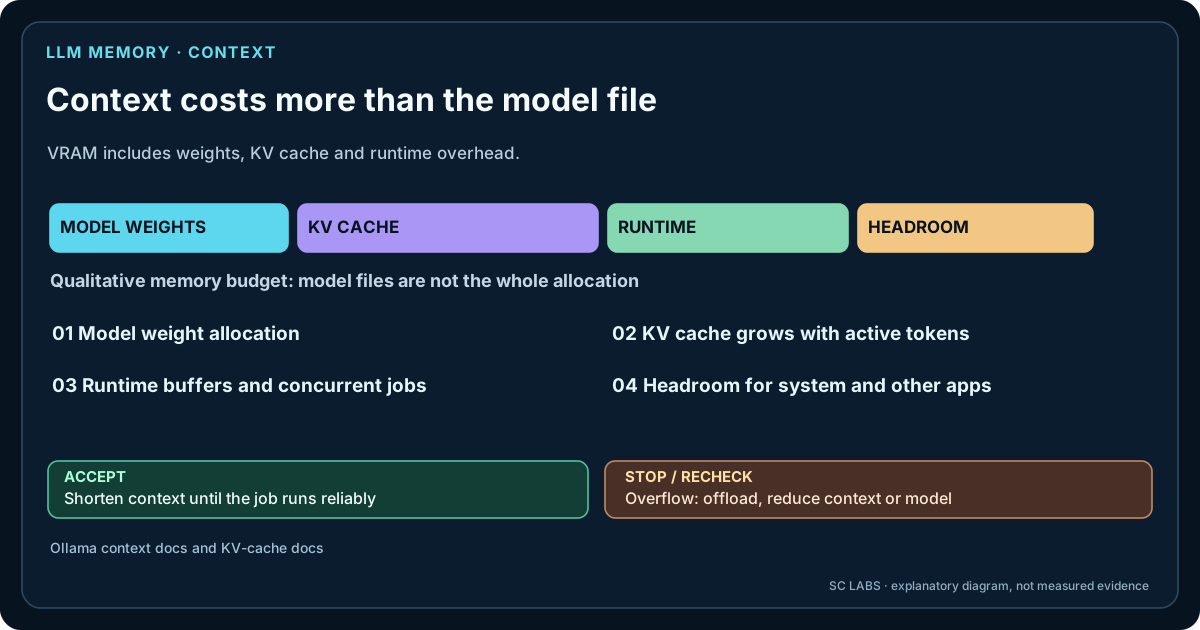
Context length is the amount of tokenised information a language model can work with in one active sequence: system instructions, conversation history, your current prompt, retrieved documents, tool descriptions and other input that the runtime keeps available to the model.
It is easy to read a model card that says “128K context” and assume that 128K is automatically the best setting. On local hardware, that can be a bad trade.
More context is useful only when the task needs it and the hardware can carry the additional memory and processing cost.
Three different context numbers are easy to confuse
| Number | What it means |
|---|---|
| Model capability | The maximum context the model architecture/training/configuration claims to support. |
| Runtime allocation | The context size your local runtime actually reserves for the loaded model. |
| Useful task context | The amount of relevant information your real task needs before extra tokens become waste, noise or unnecessary memory pressure. |
Those numbers can be very different. A model may support a large context while your runtime allocates only 4K or 8K. Conversely, increasing the runtime allocation does not guarantee that every extra token improves the answer.
What is a token?
A token is a chunk of text produced by the model's tokenizer. It is not the same as a word or a character. One short English word may be one token; longer words, punctuation, code and other languages can be split differently.
That means “8K context” means roughly 8,000 tokens, not 8,000 words.
Why context consumes memory: the KV cache
Autoregressive language models generate one token at a time. During attention, the model needs information derived from earlier tokens. Recomputing all of that history from scratch for every new token would be extremely expensive.
A key-value cache (KV cache) stores attention-related values for previous tokens so they can be reused during generation. Hugging Face's current Transformers documentation describes the KV cache as a core optimisation for autoregressive generation: it saves repeated computation but consumes memory.
As the active sequence becomes longer, the cache has more token history to represent. The exact memory cost depends on the model architecture, number of layers, attention layout, cache data type, runtime and whether techniques such as sliding-window attention are used. There is therefore no honest universal formula such as “one token always costs X MB”.
The model file is not the whole VRAM bill
When a local model is loaded, memory is used for more than just the quantised model weights.
- model weights,
- KV/context cache,
- compute and temporary buffers,
- runtime/backend overhead,
- possibly vision or other auxiliary components,
- and the rest of the Windows desktop and applications sharing the GPU.
This is why a model that appears to “fit” from file size alone can run out of headroom when context is increased.
llama.cpp exposes these pieces directly: its CLI allows a context-size setting, KV-cache offload controls and separate cache data types for keys and values. The project also documents that the KV buffer is distinct from model-weight and compute buffers.
Why 4K can work while 32K suddenly hurts
Imagine a model that already uses most of an 11 or 12 GB GPU for weights and runtime buffers. At a modest context, it may remain mostly or entirely GPU-resident. Increase the context substantially and the additional cache can consume the remaining headroom.
Depending on the runtime and backend, the result may be:
- an out-of-memory error,
- more CPU/RAM offload,
- reduced concurrency,
- slower prompt processing,
- or a configuration that technically works but feels much worse interactively.
That is one reason our Windows local-LLM setup guide recommends leaving memory headroom rather than filling VRAM to the last available byte.
Current Ollama behaviour makes the hardware trade-off visible
Ollama's current context-length documentation explicitly states that larger context requires more memory. Its current automatic defaults also vary by VRAM class rather than always allocating the model's advertised maximum.
The same documentation recommends checking loaded models with ollama ps so you can see the allocated context and whether execution is on GPU or split with CPU.
ollama ps
For a manual server-wide context setting, Ollama currently supports:
OLLAMA_CONTEXT_LENGTH=8192 ollama serve
Exact defaults and supported settings change, so treat the official documentation as the source of truth for your installed version.
Context is not just your visible prompt
Agent and application stacks often consume context before you type anything.
The active window may include:
- system instructions,
- tool/function schemas,
- conversation history,
- retrieved RAG passages,
- project rules,
- file excerpts,
- and the current user request.
A tool-heavy agent can therefore use substantially more context than a simple chat with the same visible user message.
You also need room for the answer
Do not allocate the entire practical context budget to input. The model still needs room to generate output. Long code generation, reports or tool plans can require thousands of additional tokens.
A useful mental model is:
system + history + retrieved content + current prompt + output headroom ≤ practical context budget.
The runtime and API may account for generation limits differently, but the planning principle remains useful.
Longer context also means more prompt work
Before generating the next token, the runtime has to process the input context. A 30,000-token prompt therefore contains much more work than a 2,000-token prompt even if the eventual answer is short.
Prompt-processing speed and generation speed are separate measurements. A model can generate quickly once it starts while still taking noticeable time to ingest a very large document or conversation.
Does a model use all advertised context equally well?
Not necessarily. Maximum supported context is a technical limit, not a guarantee that answer quality remains identical at every position and every workload. Model architecture, training distribution, positional encoding/scaling and the relevance of the supplied information all matter.
For local use, the safest approach is empirical: test the document length and retrieval pattern you actually need rather than assuming the largest advertised number is automatically the best operating point.
What about sliding-window attention?
Some models use attention schemes that do not retain every layer's full history in the same way. That can change KV-cache behaviour significantly. Modern runtimes also expose cache quantisation, offload and other memory-saving strategies.
This is another reason generic “X GB VRAM = Y context” tables age badly. The model architecture and runtime configuration matter.
KV-cache quantisation can reduce memory pressure
Some runtimes allow the KV cache itself to use lower precision. Ollama currently exposes configurable KV-cache quantisation when Flash Attention is enabled, and llama.cpp exposes separate key/value cache data types including f16, q8 and q4-class options.
That can materially reduce context memory use, but it adds another quality/performance variable. Test it like any other quantisation choice rather than assuming the memory saving is free.
Parallel requests can multiply the context problem
If one local server handles several requests at once, context is no longer only a single-user concern. Ollama's current FAQ notes that parallel request processing increases context allocation and required memory.
A configuration that works perfectly for one interactive user can therefore become memory-heavy when used as a local API for several agents or applications at the same time.
A practical context-selection method
Before increasing the limit: record the configured context size, the actual input length, prompt-processing time, available system RAM and GPU memory. Retest the same task with a longer context while keeping the model and quantization unchanged. If more context does not improve a verifiable answer, the extra allocation may be unnecessary.
Context budgets interact with model instructions and generation limits. Our operating-profile experiment measured shorter versus fuller controller prompts; the survival challenge documented six generations hitting their output-length ceiling.
- Start with the task. Estimate whether you actually need a few thousand tokens, a long document, or a large agent history.
- Choose a conservative runtime context. Do not begin at the advertised maximum.
- Load the model and inspect GPU/RAM use.
- Run a short prompt and a representative long prompt.
- Measure prompt-ingestion time and generation speed separately.
- Check task quality at the longer context.
- Increase again only when the task benefits.
Example: an 11 GB-class GPU
Our RTX 2080 Ti workstation testing already showed why hardware headroom matters: a large 27B Q4 model could technically run, but at only about 3.79 generated tokens per second in our test path. That result was not a context benchmark, so we do not pretend it measures KV-cache scaling.
It does illustrate the planning problem. When a model already sits close to a hardware limit, increasing context adds another memory requirement on top of an already constrained setup. A smaller model may leave far more room for useful context, tool schemas and concurrent application work.
How context and quantisation fit together
Weight quantisation and context are separate memory levers.
A lower model quant can free VRAM for a larger context. A higher quant can preserve more weight precision but leave less room for cache. The right balance depends on the task.
Read Local LLM Quantization Explained: Q4 vs Q5 vs Q8 for the weight side of that trade-off.